System Tray Icon to Monitor Off
Use System Tray Icon for Monitor Off. Configurable System Tray Icon can be hidden or can be changed to any .ico file.The System Tray Icon can be configured to do other actions apart from initiating Monitor Off Action.
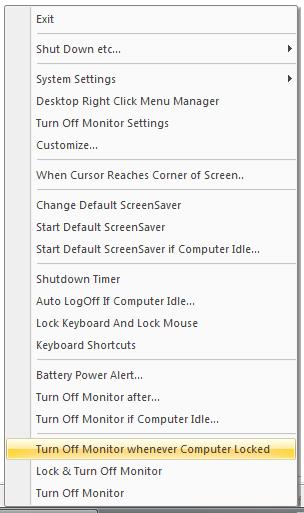
Monitor Off System Tray Icon and Menu
Download Free Trial of the utility to turn monitor off now
How to use System Tray Icon to Monitor Off
- Download and Launch the Utility.
- By Default the Utility displays an icon in System Tray.
- You can opt not to display the icon in System Tray.
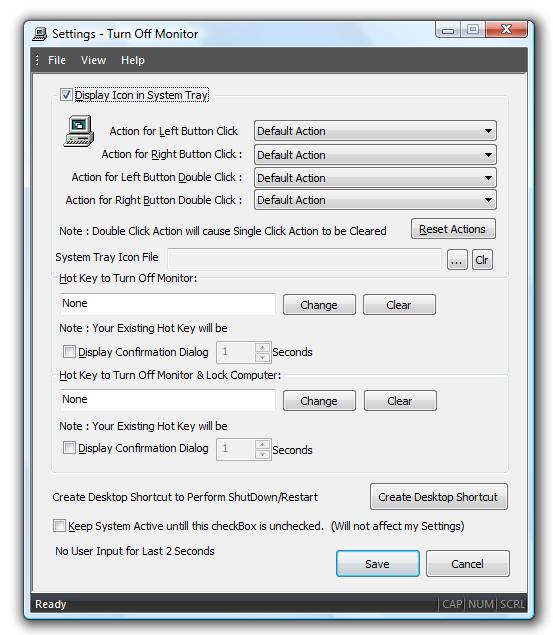
- You can change the icon displayed in System Tray using a .ico file from Settings.
- Right Click on the System Tray Icon and click on Turn Off Monitor or select Lock & Turn Off Monitor(this action will Lock your computer and then will switch monitor off).
- Double click on System Tray Icon to Switch Monitor Off.
- Action to be taken on Left Button click of System Tray Icon can be changed from settings.
- Action to be taken on Right Button click of System Tray Icon can be changed from settings.
- Action to be taken on Left Button Double click of System Tray Icon can be changed from settings.
- Action to be taken on Right Button Double click of System Tray Icon can be changed from settings.
Configurable Settings
Monitor Off