Lock Computer and Monitor Off
Lock Computer and let the software do monitor off automatically or lock computer and monitor off simultaneously.Download and Switch Monitor Off whenever Computer is Locked or Lock Computer and Switch Monitor Off.
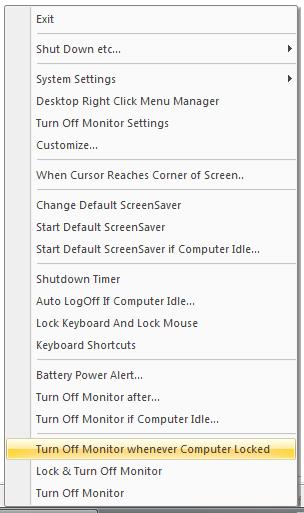
How to Lock Computer and Monitor Off Simultaneously
- Download and Launch the Utility.
- By Default the Utility displays an icon in System Tray.
- Right Click on the System Tray Icon and click on Lock & Turn Off Monitor.
- Above action will Lock Computer / Lock Workstation and monitor off simultaneously.
How to automatically turn Monitor Off whenever Computer is Locked
- Download and Launch the Utility.
- By Default the Utility displays an icon in System Tray.
- Right Click on the System Tray Icon and click on Turn Off Monitor whenever Computer Locked.
- Above action will display a dialog box in which you can enable / disable whether to turn monitor off automatically, whenever your computer is locked automatically or manually.
Home of Monitor Off for more screenshots and features.