Desktop Shortcut to Monitor Off, Hibernate, Shutdown and more
Create Desktop Shortcuts to Switch Monitor Off of a laptop or Desktop, Hibernate Computer, Shutdown Computer, etc. Opt for displaying a confirmation dialog box whenever the desktop shortcut is launched. Optionally create Shortcut Key from the Desktop Shortcut properties to launch the Shortcut from the properties of the Desktop Shortcut.
Settings to Control Monitor Off and more
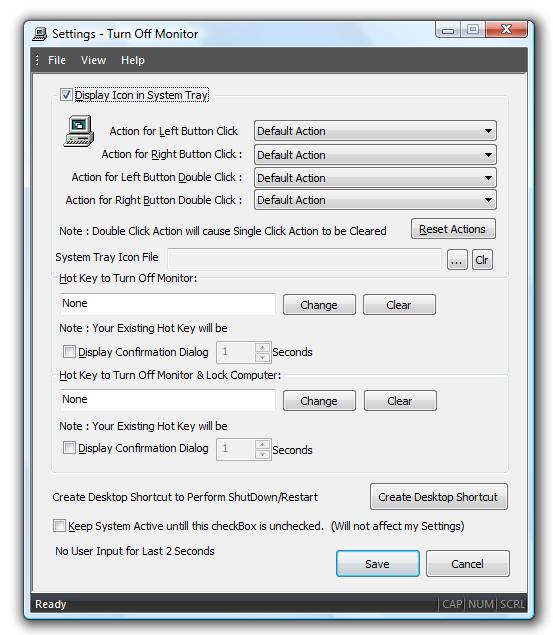
Download and let your Desktop Shortcuts help you to control your computer.
How to create Desktop Shortcut to Monitor Off,Hibernate and much more...
- Download and Launch the Installer.
- During Installation, select the option to create Desktop Shortcut.
- Finish the Installation and look for Turn Off Monitor Settings shortcut on Desktop.
- Optionally you can launch the application and right click on System Tray Menu to display System Tray Menu and select Turn Off Monitor Settings.
- Once Settings Dialog box is displayed, locate and click on the button Create Desktop Shortcut.
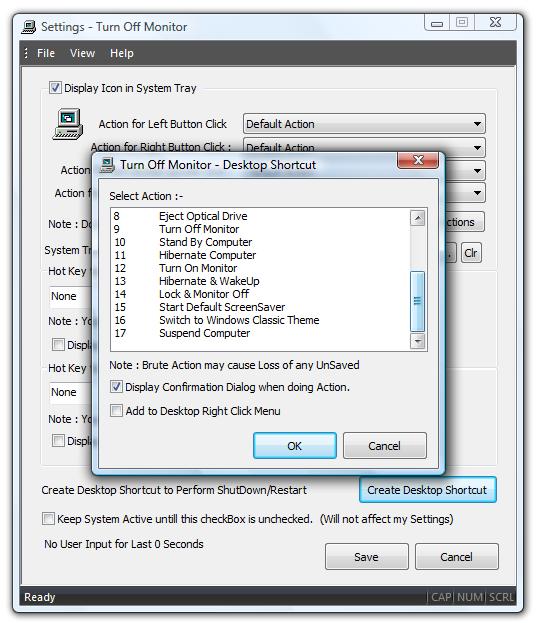
- The above action will display a Dialog Box in which you can select the required action (e.g. Monitor Off,Hibernate,Shutdown Computer,Restart Computer,Lock Computer etc).
- Select the appropriate action from the List Box.
- You can opt to display a confirmation dialog box when Desktop Shortcut will be executed.
- After selecting the required options, click on OK to create new Desktop Shortcut.
Desktop Shortcut Dialog Box
Monitor Off