Monitor Off after configurable duration
This functionality allows to configure duration after which the software utility offered here would Switch Monitor Off.This action will be performed only one time. The Software also offers to Switch Monitor Off whenever there is no user input for defined duration.
Download Free Trial of the utility to Turn Monitor Off Now
How to switch Monitor Off after configurable duration (in minutes)
- Download and Launch the Utility.
- By Default the Utility displays an icon in System Tray.
- Right Click on the System Tray Icon and click on Turn Off Monitor after....
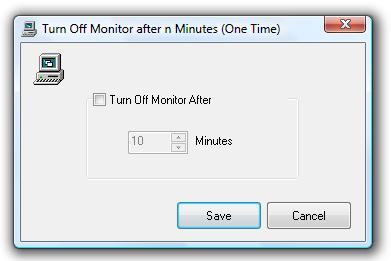
- The above action will display a dialog box to enable/disable this feature.
- Check the Check Box and enter the duration (in minutes) after which the utility should switch monitor off.
- Click on Save button to close the dialog box and save the changes.
- Once this feature is enabled, Tooltip of the System Tray Icon displays the duration after which the utility will switch monitor off.
Dialog Box to configure duration (in minutes)
Monitor Off for feature list and more screenshots.